Writing Gadget Data Query Criteria
- Search condition JSON object
A JSON object that defines search criteria using one or more search expressions.
Search condition JSON objects are a tool that empowers you with the ability to define gadget data query criteria of various complexity for searching and filtering gadget data records in the application database (DB). To write search condition JSON objects, you should know the following:
The names and data types of gadget data record properties in the DB.
The logical, comparison, and SQL operators that the search condition JSON objects support.
Comparing strings
- String
A piece of textual data—a string of characters.
The data type of some gadget data record properties is text in the DB. Such properties are User Identifier, Customer Ref. identifier, Data id, Value, etc. To consult on the data type of a gadget data record property, see Gadget Data Record Property Mapping.
The properties in question keep values as strings in the DB even when these values were entered in gadgets as numbers. For example, if a document user entered their PIN in the User Identifier field of a login gadget and a number in a numeric data capture field of a data capture gadget, the entered PIN and number are saved and kept in the user_identifier and value DB fields as strings. Thus, searching and filtering against such fields involves comparing strings, including numbers saved as strings.
In the DB and code, string values are always enclosed by double or single quotation marks, for example, "John Doe", "1200", "abc-abc-abc", and so on.
Strings are compared character by character, following the character position in the string: from the first to the last. The comparison of each character depends on its type: a letter, number, or special character. The rules for comparing the characters are configured in the DB because the application sends a query to the DB that compares the values against the query criteria to retrieve the data.
This section describes how strings are compared by the DB of the Canvas Envision cloud SaaS solution. If your Canvas Envision instance is self-hosted, your DB may be configured to compare strings using different rules. In such a case, consult with your DB administrator.
The DB for the Canvas Envision cloud SaaS solution compares strings based on Unicode en_US.UTF8 collation rules. The precedence of character types in ascending order is as follows:
Special characters.
Numbers from
"0"to"9".Lowercase letters from
"a"to"z".Uppercase letters from
"A"to"Z".
The comparison of special characters depends on multiple factors, including but not limited to their kinds and positions in the string. For example, underscores "_" and hyphens "-" may be equal or ignored in some case where they are used as separators in long pieces of data, like "abc-abc-abc" or "abc_abc_abc".
Numbers in textual gadget data record properties are compared as strings, not as numbers; for example, "1200" < "21" < "3" because the first character is lower in the first string and higher in the third one. To compare numbers from textual gadget data record properties as numbers, you need to convert them into a numeric data type, such as an integer or float, after retrieving the gadget data records from the DB.
Latin letters follow the rules of the English alphabet. Uppercase letters are higher than lowercase letters; for example, "john doe" < "John Doe".
For more details on non-English letters and special characters, see Unicode Collation Algorithm.
The syntax of search condition JSON objects
A search condition JSON object consists of one or more search expressions, each of which represents a complete search criterion. A search expression is constructed with one or more building blocks of search condition JSON objects—key-value pairs. Understanding the syntax and elements of these key-value pairs is the foundation for composing search condition JSON objects. The simplest search expression is a single key-value pair that defines a complete implicit equal search criterion. A complex search expression is a key-value pair with a nested key-value pair that defines a conditional clause. The power of search condition JSON objects lies in creating highly complex search criteria by joining simple and complex search expressions using the AND and OR logical operators on one or more levels. Each such join is also a key-value pair. Thus, writing search condition JSON objects involves nesting and joining key-value pairs.
Building blocks of search condition JSON objects
A basic building block of a search condition JSON object is a key-value pair of strings separated by a colon and enclosed by curly braces.
Key
A pair key can be:
The name of a gadget data record property in the DB. In such a case:
The key is a search parameter against which gadget data records are filtered out.
The key-value pair is a complete, simple or complex search expression.
{"customer_ref_identifier": "value"}A supported logical, comparison, or SQL operator. In such a case:
Value
A pair value can be:
An actual value as a string. In such a case:
The pair key is the name of a gadget data record property in the DB or an operator that is not AND or OR.
The pair value is a search operand against which the given gadget data record property is compared.
{"customer_ref_identifier": "102030"}A nested key-value pair. In such a case:
The pair key is the name of a gadget data record property in the DB.
The pair value—the nested key-value pair—is a conditional clause that defines a condition with one or more operands against which the given gadget data record property is compared:
The key of the nested pair is an operator that is not AND or OR.
The value of the nested pair is an operand or an array of operands if the given operator supports multiple operands.
{"customer_ref_identifier": {"$ne": "102030"} }The
trueBoolean value. In such a case:The pair is nested in the value of another pair.
The key of the nesting pair is the name of a gadget data record property in the DB.
The pair is a conditional clause that defines a condition with one Boolean operand against which the given gadget data record property is compared.
The pair key is an SQL operator that accepts a Boolean operand: Is Null or Is Not Null.
{"gadget_type": {"$isnull": true} }An array of strings. In such a case:
The pair is nested in the value of another pair.
The key of the nesting pair is the name of a gadget data record property in the DB.
The pair is a conditional clause that defines a condition with more than one operand against which the given gadget data record property is compared.
The pair key is an SQL operator that accepts multiple operands: In, Lowercase In, Not In, Lowercase Not In, or Between.
{"user_identifier": {"$in": ["Jane Smith", "John Doe", "Johnnie Doe" ] } }An array of nested key-value pairs. In such a case:
The pair value is multiple search expressions joined by the given logical operator.
The pair is a logical join expression.
{"$or": [ {"customer_ref_identifier": "102030"}, {"customer_ref_identifier": "102040"} ] }
Implicit equal comparison
A simplest search condition JSON object is a single-level key-value pair where you compare a gadget data record property against an actual value. For example, the following pair asks the system to find all the gadget data records whose customer_ref_identifier property value is equal to the "102030" operand.
You can read this example as follows:
customer_ref_identifieris"102030".
Such a key-value pair is a simple single-level search expression, where:
The key is a search parameter represented by a gadget data record property.
The value is a search operand represented by an actual value.
The comparison operator is an implicit equal.
Comparing one parameter against one operand
Comparing a gadget data record property against an operand using an operator other than an implicit equal requires a conditional clause represented by a key-value pair nested in the top-level value. The following example is the opposite of the previous one; it asks the system to find all the gadget data records whose customer_ref_identifier property value is not equal to the "102030" operand.
You can read this example as follows:
customer_ref_identifieris not"102030".
Such a key-value pair is a complex two-level search expression, where:
Comparing one parameter against multiple operands with one SQL operator
The following SQL operators support multiple operands:
Comparing a gadget data record property against more than one operand using any of the above-listed operators follows the same syntax rules as for one operand. The difference is in the conditional clause, where the value is an array of strings that represent the operands. The following example asks the system to find all the gadget data records whose user_identifier property value is "Jane Smith", "John Doe", or "Johnnie Doe".
You can read this example as follows:
user_identifieris any in the following:"Jane Smith","John Doe", or"Johnnie Doe".
Such a key-value pair is a complex two-level search expression, where:
The top-level key is a search parameter represented by a gadget data record property.
The top-level value is a conditional clause, where:
The nested-level key is an explicit SQL operator that accepts multiple values.
The nested-level value is an array of operands represented by actual string values.
Comparing one parameter against multiple operands with multiple operators
Comparing a gadget data record property against more than one operand using various operators requires a join of multiple expressions with the AND or OR logical operator. The top level of such a search condition JSON object includes the logical operator as the key and an array of expressions as the value. In each such expression, the key is the same gadget data record property, and the value is a different operand or conditional clause. The following example asks the system to find all the gadget data records whose customer_ref_identifier property value is greater than the "102030" operand and less than the "204030" operand.
You can read this example as follows:
All must be true:
customer_ref_identifieris greater than"102030".AND
customer_ref_identifieris less than"204030".
Such a key-value pair is a complex three-level search expression, where:
The top-level value is an array of simple and complex search expressions, where:
The second-level key is a search parameter represented by the same gadget data record property.
The second-level value is an operand or a conditional clause. In the latter case:
The third-level key is an explicit operator that is not AND or OR.
The third-level value is an operand represented by an actual string or Boolean value or an array of multiple operands represented by actual string values if the operator can accept more than one operand.
Comparing multiple parameters against multiple operands with multiple operators
Comparing multiple gadget data record properties against more than one operand using various operators follows the same syntax rules as for one property. The difference is that the keys of expressions nested in the array are different properties. The following example asks the system to find all the gadget data records whose properties meet all of the following criteria:
The
customer_ref_identifierproperty value is greater than the"102030"operand and less than the"204030"operand.The
user_identifierproperty value is equal to the"John Doe"operand.
You can read this example as follows:
All must be true:
customer_ref_identifieris greater than"102030".AND
customer_ref_identifieris less than"204030".AND
user_identifieris"John Doe".
Complex AND and OR conditions
Comparing one or more gadget data record properties against more than one operand joined with multiple AND or OR conditions requires nesting these conditions into each other. The top level of such a search condition JSON object includes the AND or OR logical operator as the key and an array of key-value pairs as the value. Each pair in the array has the AND or OR operator as the key and an array of key-value pairs as the value. Nesting can go down as many levels as necessary. The following example asks the system to find all the gadget data records whose properties meet the following criteria:
Both of the following must be true:
The
customer_ref_identifierproperty value is greater than the"102030"operand and less than the"204030"operand.The
user_identifierproperty value is equal to the"John Doe"or"Jane Smith"operand.
You can read this example as follows:
All must be true:
All must be true:
customer_ref_identifieris greater than"102030".AND
customer_ref_identifieris less than"204030".
AND EITHER must be true:
user_identifieris"John Doe".OR
user_identifieris"Jane Smith".
This key-value pair is a complex four-level search expression, where:
The top-level value is an array of join expressions, where:
The second-level value is an array of search expressions, where:
The third-level key is a search parameter represented by a gadget data record property.
The third-level value is an operand or a conditional clause. In the latter case:
The fourth-level key is an explicit operator that is not AND or OR.
The fourth-level value is an operand represented by an actual string or Boolean value or an array of multiple operands represented by actual string values if the operator can accept more than one operand.
This explanation is simplified for understanding complex multi-level AND and OR conditions. In a joining array at any level, a key-value pair can be a search expression or a logical join. The following is the previous example refined with a simple search expression that is nested in the top-level AND array and requires the key property value of the returned records to be "TV1" in addition to other criteria.
You can read this example as follows:
All must be true:
keyis"TV1".AND all must be true:
customer_ref_identifieris greater than"102030".AND
customer_ref_identifieris less than"204030".
AND EITHER must be true:
user_identifieris"John Doe".OR
user_identifieris"Jane Smith".
Operators in search condition JSON objects
Search condition JSON objects support the following logical, comparison, and SQL operators:
"$and": AND"$or": OR"$eq": Equal"$eqL": Lowercase Equal"$ne": Not Equal"$neL": Lowercase Not Equal"$gt": Greater Than"$lt": Less Than"$gte": Greater Than Or Equal"$lte": Less Than Or Equal"$starts": Starts With"$startsL": Lowercase Starts With"$ends": Ends With"$endsL": Lowercase Ends With"$cont": Contains"$contL": Lowercase Contains"$excl": Excludes"$exclL": Lowercase Excludes"$in": In"$inL": Lowercase In"$notin": Not In"$notinL": Lowercase Not In"$between": Between"$isnull": Is Null"$notnull": Is Not Null
AND
The AND logical operator joins multiple search expressions in an array that is true if each expression is true.
AND syntax
AND examples
Against the following search condition JSON object, the system will return the gadget data records whose customer_ref_identifier property has a value between "102030" and "204030" AND whose user_identifier property value is "John Doe".
AND discussion
The AND operator cannot be used as a key in a conditional clause. Its value is always an array of key-value pairs, not a string or conditional clause.
Multiple AND and OR operators can be combined by nesting.
For looking up values in a closed range, it is better to use the Between operator rather than joining the Greater Than and Less Than expressions with the AND operator.
OR
The OR logical operator joins multiple search expressions in an array that is true if at least one expression is true.
OR syntax
OR examples
Against the following search condition JSON object, the system will return the gadget data records whose user_identifier property value is "Jane Smith" or "John Doe".
OR discussion
The OR operator cannot be used as a key in a conditional clause. Its value is always an array of key-value pairs, not a string or conditional clause.
Multiple AND and OR operators can be combined by nesting.
When comparing one gadget data property with the Equal operator against multiple operands joined with the OR condition, it is better to use the In operator.
Equal
The Equal operator compares the value of a gadget data record property for an exact case-sensitive match with an operand.
Equal syntax
You can specify the Equal operator implicitly or explicitly.
Implicit Equal syntax
Explicit Equal syntax
Equal examples
The following search condition JSON objects specify the same search criterion. Against each, the system will return the gadget data records whose user_identifier property value is "John Doe". As the Equal comparison is case-sensitive, the records that have the same value but with letters in a different case, like "john doe", will not be returned.
Implicit Equal example
Explicit Equal example
Equal discussion
The Equal operator is the opposite of Not Equal.
For case-insensitive comparisons, use the Lowercase Equal operator.
The Equal operator compares against one operand. If you need to compare one gadget data property for case-sensitive equality against multiple operands joined with the OR condition, use the In operator.
Lowercase Equal
The Lowercase Equal operator compares the value of a gadget data record property for an exact case-insensitive match with a lowercase operand.
Lowercase Equal syntax
Where:
"lowercase operand": a string whose all letters are in lower case.
Lowercase Equal examples
Against the following search condition JSON object, the system will return the gadget data records whose user_identifier property value is "john doe" written with letters in any case, like "John Doe", "John doe", "JOHN DOE", and so on.
As the Lowercase Equal operator requires the operand to be in lower case, the system will not return any gadget data records against the following search condition JSON object, whose operand includes one or more letters in upper case, such as "John Doe".
Lowercase Equal discussion
The Lowercase Equal operator is equivalent to LOWER(property) = 'lowercase operand' in SQL.
It is the opposite of Lowercase Not Equal.
For case-sensitive comparisons, use the Equal operator.
The Lowercase Equal operator compares against one operand. If you need to compare one gadget data property for case-insensitive equality against multiple operands joined with the OR condition, use the Lowercase In operator.
Not Equal
The Not Equal operator compares the value of a gadget data record property for an exact case-sensitive mismatch with an operand.
Not Equal syntax
Not Equal examples
Against the following search condition JSON object, the system will not return the gadget data records whose user_identifier property value is "John Doe". As the not equal comparison is case-sensitive, the records that have the same value but with letters in a different case, like "john doe", will be returned.
Not Equal discussion
The Not Equal operator is the opposite of Equal.
For case-insensitive comparisons, use the Lowercase Not Equal operator.
The Not Equal operator compares against one operand. If you need to compare one gadget data property for case-sensitive inequality against multiple operands joined with the OR condition, use the Not In operator.
Lowercase Not Equal
The Lowercase Not Equal operator compares the value of a gadget data record property for an exact case-insensitive mismatch with a lowercase operand.
Lowercase Not Equal syntax
Where:
"lowercase operand": a string whose all letters are in lower case.
Lowercase Not Equal examples
Against the following search condition JSON object, the system will not return the gadget data records whose user_identifier property value is "john doe" with letters in any case, like "John Doe", "John doe", "JOHN DOE", and so on.
As the Lowercase Not Equal operator requires the operand to be in lower case, the system will return the gadget data records with the values described in the previous example against the following search condition JSON object because its operand includes one or more letters in upper case, such as "John Doe".
Lowercase Not Equal discussion
The Lowercase Not Equal operator is equivalent to LOWER(property) != 'lowercase operand' in SQL.
It is the opposite of Lowercase Equal.
For case-sensitive comparisons, use the Not Equal operator.
The Lowercase Not Equal operator compares against one operand. If you need to compare one gadget data property for case-insensitive inequality against multiple operands joined with the OR condition, use the Lowercase Not In operator.
Greater Than
The Greater Than operator outputs true if the value of a gadget data record property is larger than an operand.
Greater Than syntax
Greater Than examples
Against the following search condition JSON object, the system will return the gadget data records whose customer_ref_identifier property value is greater than "102030".
Greater Than discussion
The Greater Than operator can compare textual data. The comparison is case-sensitive. Numbers in textual fields, like key, value, customer_ref_identifier, user_identifier, etc., are compared as strings, not as numbers. For details, see Comparing strings.
For looking up values in a closed range, it is better to use the Between operator rather than joining the Greater Than and Less Than expressions with the AND operator.
Less Than
The Less Than operator outputs true if the value of a gadget data record property is smaller than an operand.
Less Than syntax
Less Than examples
Against the following search condition JSON object, the system will return the gadget data records whose customer_ref_identifier property value is less than "204030".
Less Than discussion
The Less Than operator can compare textual data. The comparison is case-sensitive. Numbers in textual fields, like key, value, customer_ref_identifier, user_identifier, etc., are compared as strings, not as numbers. For details, see Comparing strings.
For looking up values in a closed range, it is better to use the Between operator rather than joining the Greater Than and Less Than expressions with the AND operator.
Greater Than Or Equal
The Greater Than Or Equal operator outputs true if the value of a gadget data record property is larger than or equal to an operand.
Greater Than Or Equal syntax
Greater than or equal examples
Against the following search condition JSON object, the system will return the gadget data records whose customer_ref_identifier property value is greater than or equal to "102030".
Greater Than Or Equal discussion
The Greater Than Or Equal operator can compare textual data. The comparison is case-sensitive. Numbers in textual fields, like key, value, customer_ref_identifier, user_identifier, etc., are compared as strings, not as numbers. For details, see Comparing strings.
For looking up values in a closed range, it is better to use the Between operator rather than joining the Greater Than Or Equal and Less Than Or Equal expressions with the AND operator.
Less Than Or Equal
The Less Than Or Equal operator outputs true if the value of a gadget data record property is smaller than or equal to an operand.
Less Than Or Equal syntax
Less Than Or Equal examples
Against the following search condition JSON object, the system will return the gadget data records whose customer_ref_identifier property value is less than or equal to "204030".
Less Than Or Equal discussion
The Less Than Or Equal operator can compare textual data. The comparison is case-sensitive. Numbers in textual fields, like key, value, customer_ref_identifier, user_identifier, etc., are compared as strings, not as numbers. For details, see Comparing strings.
For looking up values in a closed range, it is better to use the Between operator rather than joining the Greater Than Or Equal and Less Than Or Equal expressions with the AND operator.
Starts With
The Starts With operator outputs true if the value of a gadget data record property begins with a pattern that is equal to a given operand in an exact case-sensitive match.
Starts With syntax
Starts With examples
Against the following search condition JSON object, the system will return the gadget data records whose user_identifier property value begins with "John", such as "John Doe", "Johnnie Doe", "John Smith", and so on. As the Starts With comparison is case-sensitive, the records that have the same value but with letters in a different case, like "john doe", "johNnie Doe", "JOHN Smith", will not be returned.
Starts With discussion
The Starts With operator is equivalent to LIKE 'operand%' in SQL.
For case-insensitive comparisons, use the Lowercase Starts With operator.
Lowercase Starts With
The Lowercase Starts With operator outputs true if the value of a gadget data record property begins with a pattern that is equal to a given operand in a case-insensitive match.
Lowercase Starts With syntax
Lowercase Starts With examples
Against the following search condition JSON object, the system will return the gadget data records whose user_identifier property value begins with "john" written with letters in any case, such as "John Doe", "john Doe", "Johnnie Doe", "johNnie Doe", "John Smith", "JOHN Smith", and so on.
The system will return the same results as for the previous example if the operand has one or more letters in upper case, like "John".
Lowercase Starts With discussion
The Lowercase Starts With operator is equivalent to LIKE|ILIKE 'operand%' in SQL, where ILIKE is an insensitive LIKE in PostgreSQL and some other databases.
For case-sensitive comparisons, use the Starts With operator.
Ends With
The Ends With operator outputs true if the value of a gadget data record property ends with a pattern that is equal to a given operand in an exact case-sensitive match.
Ends With syntax
Ends With examples
Against the following search condition JSON object, the system will return the gadget data records whose user_identifier property value ends with "oe", such as "John Doe", "Johnnie oe", "Jane Shmoe", and so on. As the Ends With comparison is case-sensitive, the records that have the same value but with letters in a different case, like "John DOE", "Johnnie Oe", "Jane ShmoE", will not be returned.
Ends With discussion
The Ends With operator is equivalent to LIKE '%operand' in SQL.
For case-insensitive comparisons, use the Lowercase Ends With operator.
Lowercase Ends With
The Lowercase Ends With operator outputs true if the value of a gadget data record property ends with a pattern that is equal to a given operand in a case-insensitive match.
Lowercase Ends With syntax
Lowercase Ends With examples
Against the following search condition JSON object, the system will return the gadget data records whose user_identifier property value ends with "oe" written with letters in any case, such as "John Doe", "John DOE", "Johnnie oe", "Johnnie Oe", "Jane Shmoe", "Jane ShmoE", and so on.
The system will return the same results as for the previous example if the operand has one or more letters in upper case, like "OE".
Lowercase Ends With discussion
The Lowercase Ends With operator is equivalent to LIKE|ILIKE '%operand' in SQL, where ILIKE is an insensitive LIKE in PostgreSQL and some other databases.
For case-sensitive comparisons, use the Ends With operator.
Contains
The Contains operator outputs true if the value of a gadget data record property includes, at any position, a pattern equal to a given operand in an exact case-sensitive match.
Contains syntax
Contains examples
Against the following search condition JSON object, the system will return the gadget data records whose value property value contains "AB" at any position, such as "AB2030", "10AB30", "1020AB", and so on. As the Contains comparison is case-sensitive, the records that have the same value but with letters in a different case, like "aB2030", "10ab30", "1020Ab", and so on, will not be returned.
Contains discussion
The Contains operator is equivalent to LIKE '%operand%' in SQL.
It is the opposite of Excludes.
For case-insensitive comparisons, use the Lowercase Contains operator.
Lowercase Contains
The Lowercase Contains operator outputs true if the value of a gadget data record property includes, at any position, a pattern equal to a given operand in a case-insensitive match.
Lowercase Contains syntax
Lowercase Contains examples
Against the following search condition JSON object, the system will return the gadget data records whose value property value contains "ab" that is located at any position and written with letters in any case, such as "AB2030", "aB2030", "10AB30", "10ab30", "1020AB", "1020Ab", and so on.
The system will return the same results as for the previous example if the operand has one or more letters in upper case, like "AB".
Lowercase Contains discussion
The Lowercase Contains operator is equivalent to LIKE|ILIKE '%operand%' in SQL, where ILIKE is an insensitive LIKE in PostgreSQL and some other databases.
It is the opposite of Lowercase Excludes.
For case-sensitive comparisons, use the Contains operator.
Excludes
The Excludes operator outputs true if the value of a gadget data record property does not include, at any position, a pattern equal to a given operand in an exact case-sensitive match.
Excludes syntax
Excludes examples
Against the following search condition JSON object, the system will not return the gadget data records whose value property value contains "AB" at any position, such as "AB2030", "10AB30", "1020AB", and so on. As the Excludes comparison is case-sensitive, the records that have the same value but with letters in a different case, like "aB2030", "10ab30", "1020Ab", and so on, will be returned.
Excludes discussion
The Excludes operator is equivalent to NOT LIKE '%operand%' in SQL.
It is the opposite of Contains.
For case-insensitive comparisons, use the Lowercase Excludes operator.
Lowercase Excludes
The Lowercase Excludes operator outputs true if the value of a gadget data record property does not include, at any position, a pattern equal to a given operand in a case-insensitive match.
Lowercase Excludes syntax
Lowercase Excludes examples
Against the following search condition JSON object, the system will not return the gadget data records whose value property value contains "ab" that is located at any position and written with letters in any case, such as "AB2030", "aB2030", "10AB30", "10ab30", "1020AB", "1020Ab", and so on.
The system will output the same results as for the previous example if the operand has one or more letters in upper case, like "AB".
Lowercase Excludes discussion
The Lowercase Excludes operator is equivalent to NOT LIKE|ILIKE '%operand%' in SQL, where ILIKE is an insensitive LIKE in PostgreSQL and some other databases.
It is the opposite of Lowercase Contains.
For case-sensitive comparisons, use the Excludes operator.
In
The In operator outputs true if the value of a gadget data record property is equal to any given operand in an exact full case-sensitive match.
In syntax
In examples
Against the following search condition JSON object, the system will return the gadget data records whose user_identifier property value is "Jane Smith", "John Doe", or "Johnnie Doe". As the In comparison is case-sensitive, the records that have the same value but with letters in a different case, like "Jane smith", "john doe", "Johnnie DOE", will not be returned.
As the In comparison requires a full match, the system will not return the gadget data records as specified in the previous example against the following search condition JSON object because its "Smith" and "Doe" operands match the discussed values partially.
In discussion
The In operator is a shorthand for comparing one gadget data property with the Equal operator against multiple operands joined with the OR condition. Thus, it can be used as a key only in a conditional clause. And, its value is always an array of strings, not a string, key-value pair, or conditional clause.
It looks for an exact full match with an operand from the list. If the value of a gadget data property includes, at any position, a pattern that matches the operand, the operator will output false for that value because the match is partial.
The In operator is equivalent to IN ('operand 1', 'operand 2', ..., 'operand N') in SQL.
It is the opposite of Not In.
For case-insensitive comparisons, use the Lowercase In operator.
Lowercase In
The Lowercase In operator outputs true if the value of a gadget data record property is equal to any given lowercase operand in an exact full case-insensitive match.
Lowercase In syntax
Where:
"lowercase operand N": a string whose all letters are in lower case.
Lowercase In examples
Against the following search condition JSON object, the system will return the gadget data records whose user_identifier property value is "jane smith", "john doe", or "johnnie doe" written with letters in any case, like "Jane Smith", "Jane smith", "John Doe", "JOHN DOE", "Johnnie Doe", "Johnnie DOE", and so on.
As the Lowercase In comparison requires a full match, the system will not return the gadget data records as specified in the previous example against the following search condition JSON object because its "smith" and "doe" operands match the discussed values partially.
As the Lowercase In operator requires the operands to be in lower case, the system will not return any gadget data records against the following search condition JSON object, whose operands include one or more letters in upper case, such as "Jane smith", "JOHN DOE", and "Johnnie Doe".
Lowercase In discussion
The Lowercase In operator is a shorthand for comparing one gadget data property with the Lowercase Equal operator against multiple operands joined with the OR condition. Thus, it can be used as a key only in a conditional clause. And, its value is always an array of strings, not a string, key-value pair, or conditional clause.
It looks for an exact full match with an operand from the list. If the value of a gadget data property includes, at any position, a pattern that matches the operand, the operator will output false for that value because the match is partial.
The Lowercase In operator is equivalent to LOWER(property) IN ('operand 1', 'operand 2', ..., 'operand N') in SQL.
It is the opposite of Lowercase Not In.
For case-sensitive comparisons, use the In operator.
Not In
The Not In operator outputs true if the value of a gadget data record property is not equal to any given operand in an exact full case-sensitive match.
Not In syntax
Not In examples
Against the following search condition JSON object, the system will not return the gadget data records whose user_identifier property value is "Jane Smith", "John Doe", or "Johnnie Doe". As the Not In comparison is case-sensitive, the records that have the same value but with letters in a different case, like "Jane smith", "john doe", "Johnnie DOE", will be returned.
As the Not In comparison requires a full match, the system will return the gadget data records as specified in the previous example against the following search condition JSON object because its "Smith" and "Doe" operands match the discussed values partially.
Not In discussion
The Not In operator is a shorthand for comparing one gadget data property with the Not Equal operator against multiple operands joined with the OR condition. Thus, it can be used as a key only in a conditional clause. And, its value is always an array of strings, not a string, key-value pair, or conditional clause.
It looks for an exact full match with an operand from the list. If the value of a gadget data property includes, at any position, a pattern that matches the operand, the operator will output false for that value because the match is partial.
The Not In operator is equivalent to NOT IN ('operand 1', 'operand 2', ..., 'operand N') in SQL.
It is the opposite of In.
For case-insensitive comparisons, use the Lowercase Not In operator.
Lowercase Not In
The Lowercase Not In operator outputs true if the value of a gadget data record property is not equal to any given lowercase operand in an exact full case-insensitive match.
Lowercase Not In syntax
Where:
"lowercase operand N": a string whose all letters are in lower case.
Lowercase Not In examples
Against the following search condition JSON object, the system will not return the gadget data records whose user_identifier property value is "jane smith", "john doe", or "johnnie doe" written with letters in any case, like "Jane Smith", "Jane smith", "John Doe", "JOHN DOE", "Johnnie Doe", "Johnnie DOE", and so on.
As the Lowercase Not In comparison requires a full match, the system will return the gadget data records as specified in the previous example against the following search condition JSON object because its "smith" and "doe" operands match the discussed values partially.
As the Lowercase Not In operator requires the operands to be in lower case, the system will return the gadget data records as specified in the first example against the following search condition JSON object, whose operands includes one or more letters in upper case, such as "Jane smith", "JOHN DOE", and "Johnnie Doe".
Lowercase Not In discussion
The Lowercase Not In operator is a shorthand for comparing one gadget data property with the Lowercase Not Equal operator against multiple operands joined with the OR condition. Thus, it can be used as a key only in a conditional clause. And, its value is always an array of strings, not a string, key-value pair, or conditional clause.
It looks for an exact full match with an operand from the list. If the value of a gadget data property includes, at any position, a pattern that matches the operand, the operator will output false for that value because the match is partial.
The Lowercase In operator is equivalent to LOWER(property) NOT IN ('operand 1', 'operand 2', ..., 'operand N') in SQL.
It is the opposite of Lowercase In.
For case-sensitive comparisons, use the Not In operator.
Between
The Between operator outputs true if the value of a gadget data record property is greater than or equal to the first given operand and less than or equal to the second given operand in a case-sensitive match.
Between syntax
Where:
"operand 1"is less than"operand 2"
Between examples
Against the following search condition JSON object, the system will return the gadget data records whose customer_ref_identifier property has a value between "102030" and "204030" operands inclusive, i.e., greater than or equal to "102030" and less than or equal to "204030".
As the second operand must be greater than the first one, the system will not return any gadget data records against the following search condition JSON object, which is the first example with the swapped operands.
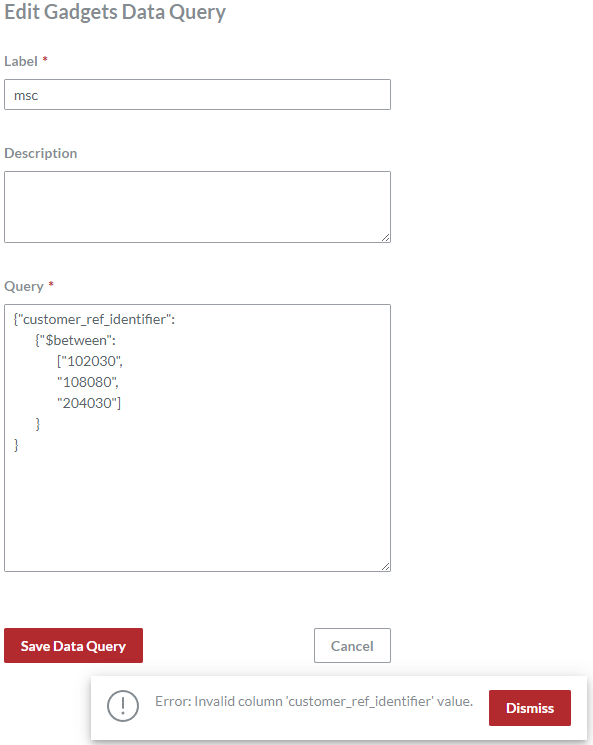
As the Between operator requires two values, the following example with an extra third operand will raise an error when saving the gadgets data query on the Edit Gadgets Data Query page. The same error occurs when trying to save the Between operator with one operand.
Between discussion
The Between operator is a shorthand for comparing one gadget data property against a range of values defined by the lowest and highest bounds using either of the following conditions:
Greater than operand 1 and less than operand 2.
Greater than or equal to operand 1 and less than or equal to operand 2.
Thus, the Between operator can be used as a key only in a conditional clause. And, its value is always an array of two strings, not a string, key-value pair, or conditional clause. The system will raise an error when saving the gadget data query with the number of operands in the array that is not two.
The Between operator can compare textual data. The comparison is case-sensitive. Numbers in textual fields, like key, value, customer_ref_identifier, user_identifier, etc., are compared as strings, not as numbers. For details, see Comparing strings.
The Between operator is equivalent to BETWEEN 'operand 1' AND 'operand 2' in SQL.
Is Null
The Is Null Boolean operator outputs true if a gadget data record property is empty—has no value set.
Is Null syntax
Is Null examples
Against the following search condition JSON object, the system will return the gadget data records whose gadget_type property has no value set.
Is Null discussion
In DBs and code, NULL is not a value. It is a flag indicating that a given property is null—completely empty—has no value set at all.
The Is Null operator verifies whether gadget data record properties have no values set by testing them against being NULL. Thus, it can be used as a key only in a conditional clause. And, its value is always true, not a string, key-value pair, or conditional clause.
An empty string that has no characters is "", not NULL, because it is a valid value. Some textual properties of login and data capture gadgets, like user_identifier, key, and value, are automatically set to an empty string when document users have not populated them with data. Such properties should be verified against "", with the Equal or Not Equal operator, not against NULL with the Is Null or Is Not Null operator.
The Is Null operator is equivalent to property IS NULL in SQL.
As the NULL operator does not accept a value in SQL, true is a dummy operand to make Is Null expressions comply with the key-value pair notation. An Is Null expression will return the same results against any operand, such as false, "", "abc", etc., because the DB ignores a value given for the NULL SQL operator. Specifying true makes it clear for understanding that the DB will return the records for which the Is Null expression is true. Specifying other operands will not change the output but will introduce a misunderstanding in reading the Is Null expression.
The Is Null operator is the opposite of Is Not Null.
Is Not Null
The Is Not Null Boolean operator outputs true if a gadget data record property is not empty—has a value set.
Is Not Null syntax
Is Not Null examples
Against the following search condition JSON object, the system will return the gadget data records whose gadget_type property has a value set.
Is Not Null discussion
In DBs and code, NULL is not a value. It is a flag indicating that a given property is null—completely empty—has no value set at all.
The Is Not Null operator verifies whether gadget data record properties have values set by testing them against not being NULL. Thus, it can be used as a key only in a conditional clause. And, its value is always true, not a string, key-value pair, or conditional clause.
An empty string that has no characters is "", not NULL, because it is a valid value. Some textual properties of login and data capture gadgets, like user_identifier, key, and value, are automatically set to an empty string when document users have not populated them with data. Such properties should be verified against "", with the Equal or Not Equal operator, not against NULL with the Is Not Null or Is Null operator.
The Is Not Null operator is equivalent to property IS NOT NULL in SQL.
As the NULL operator does not accept a value in SQL, true is a dummy operand to make Is Not Null expressions comply with the key-value pair notation. An Is Not Null expression will return the same results against any operand, such as false, "", "abc", etc., because the DB ignores a value given for the NULL SQL operator. Specifying true makes it clear for understanding that the DB will return the records for which the Is Not Null expression is true. Specifying other operands will not change the output but will introduce a misunderstanding in reading the Is Not Null expression.
The Is Not Null operator is the opposite of Is Null.
Date and time in search condition JSON objects
The data type of some gadget data record properties is date and time in the DB. Such properties are created and updated. To consult on the data type of a gadget data record property, see Gadget Data Record Property Mapping.
Searching and filtering gadget data records against the properties in question involves searching and filtering against date and time values.
You should provide operands as date and time values wrapped in strings according to the following format:
Where:
YYYY: a four-digit year.MM: a two-digit month (01–12).DD: a two-digit day of the month (01–31).T: a literal character that separates the date and time parts.hh: a two-digit hour in 24-hour format (00–23).mm: a two-digit minute (00–59).ss: a two-digit second (00–59).
For example, 6:10 PM on April 19, 2025, is specified as follows:
When working with dates, you can strip the time part as follows:
For example:
In such a case, the system will automatically add the midnight ("00:00:00") to the date for calculation and comparison; for example, "2025-04-19" will be "2025-04-19T00:00:00" to the application, and greater than "2025-04-19" will be the time and dates after "2025-04-19T00:00:00", i.e., "2025-04-19T00:00:01" and so on.
Searching against date and time is possible only for periods of time—you should specify a minute, hour, or date as a range of values, not as a single value. When specifying a date or time as a single value, such as with the Equal operator, the system will return no records. For example, the system will not return any gadget data records against the following search condition JSON objects, which are looking for records created on July 28, 2025:
To search for a date, you should specify a closed date and time range that covers 24 hours of that date: from "YYYY-MM-DDT00:00:00" to "YYYY-MM-DDT23:59:59". The easiest way to do so is to use the Between operator as follows:
Where:
"date": a searched date."next date": the date after the searched date.
For example, the system will return gadget data records that were created on July 28, 2025, against the following search condition JSON object:
As the Between operator is inclusive, it may return records created exactly at midnight of the next day, at "2025-07-29T00:00:00" in our example. To eliminate such a case, a more precise approach is to use the Greater Than Or Equal a searched date AND Less Than the next date construction:
Our example is then as follows:
You can specify open and closed date and time ranges with the following operators:
For example, the system will return gadget data records that were created before July 28, 2025 ("2025-07-28T00:00:00") against the following search condition JSON object: